Replit review
Is Replit a good choice for designers? What its AI agent builds, whether the free plan is enough, how pricing works and how it compares with Lovable.
 Sketch Focus Editorial Team
Research-based reviewNot yet tested hands-on · facts checked Nov 26, 2026How we test
From $20/mo
Free plan available
Our take so far
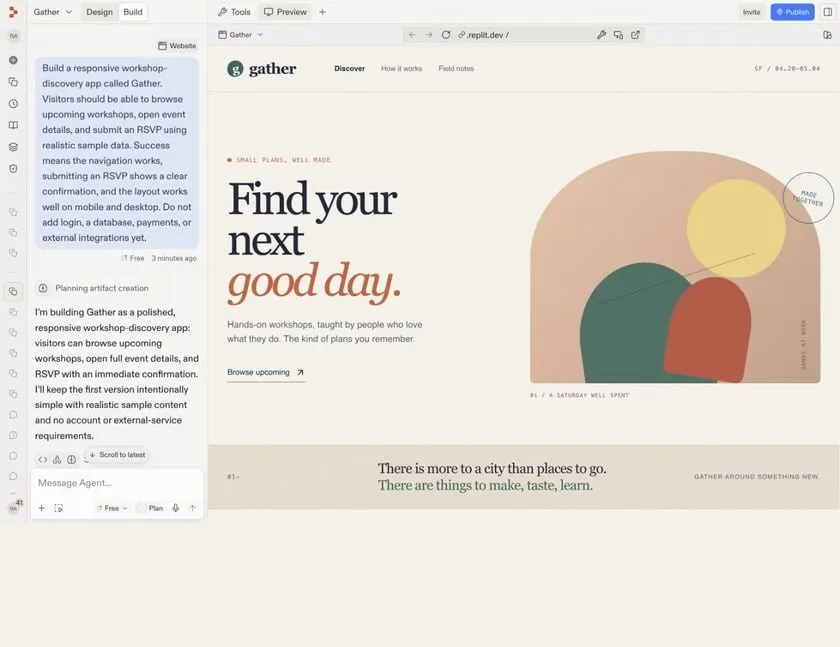
Replit can take a designer from a prompt or Figma frame to a published web or native mobile app, and its Free Mode and credit-free Visual Editor soften the cost. The catch is predictability: one dollar pot pays for AI and hosting, and Replit's own pages disagree on key billing details.

Replit
At a glance
Not scored yet. We only score tools after hands-on testing.
- What it is
- AI app builder and cloud workspace in the browser
- Free plan
- Yes
- Paid from
- $20/mo
- Builds
- Web and native mobile apps, decks, videos
- Design import
- Figma frames, screenshots, URLs
- Visual editing
- Visual Editor, no credits for simple edits
- Backend
- Built in (PostgreSQL, storage, auth)
- Export
- Zip download, GitHub sync
- Made by
- Replit, Inc.
Replit pricing
Starter
Free plan in the docs, not on the pricing page
$0/mo
- Daily AI credits, amounts not stated
- Free Mode within limits
- 1 published app, down after 30 days
- No collaborators or badge removal
Core
For solo designers
$20/mo
- $20 of monthly credits
- Free Mode, Power and Max modes
- Unlimited published apps, no badge
- Up to 5 builders
Pro
For small teams
$100/mo
- From $100 of monthly credits
- Up to 15 collaborators, pooled credits
- Up to 10 parallel tasks
- Priority support
Enterprise
For large organisations
Custom
- SSO, SCIM and audit logs
- Single-tenant and private networking
- Per-user spend limits
- EU hosting on request
Paid plans include a monthly pot of credits in dollars that pays for both AI work and hosting, and Free Mode costs nothing within an allowance. Yearly billing is up to 10% off, and tax may apply. Prices from replit.com, checked Nov 26, 2026. Plans change often, so confirm before you buy.
What Replit is
Replit is a developer’s cloud workspace that now has a proper front door for designers, but its billing asks more of you than its rivals do. You describe an app, site or other artifact, and Replit Agent builds, runs and publishes it on Replit’s cloud. Around that sit a code workspace, a design canvas called Replit Design, managed databases and hosting.
It’s made by Replit, Inc. Agent builds web apps and native mobile apps on every plan. Paid plans add other artifact types, such as data visualisations, slide decks and animated videos.
What designers can do with it
Replit Design is the reason a designer should look at Replit today. Most of it works on every plan, including the free one.
- Design on a canvas before you build (headline feature). Replit Design turns prompts into interactive design frames, and it can recreate a site from its URL or a screenshot. Building a working app from a design frame needs Core or Pro.
- Import from Figma (headline feature). Paste a Figma frame link into “Import Figma” and Agent rebuilds it as a design frame. You refine it there, then build it into an app.
- Build a design system from your own sources (headline feature). You can create one from a prompt, a Figma URL, a website, code, images or a DESIGN.md file, or extract one from a mockup. It stores colours, a type scale and tokens, which feed CSS variables, and you can apply it to existing apps.
- Polish visually without spending credits (nice extra that saves money). The Visual Editor is on all plans. Click an element to change text, colours, spacing or images, and simple edits apply to the code without spending credits.
- Native mobile apps (nice extra). Agent can build native iOS and Android apps. You can switch the preview between iOS, Android and web, test on your phone with Expo Go, and publish to the App Store.
- Invite teammates (paid-only). Core allows up to 5 collaborators and Pro up to 15, and collaborators don’t need a paid plan. Starter has no collaboration seats.
- A real backend (nice extra). Agent sets up managed PostgreSQL, file storage and sign-in. Clerk Auth lets you use your own branding, while Replit Auth is Replit-branded.
How good is the design output?
The reviews in our sources say little about Replit’s visual output from a designer’s point of view, so the evidence here is thin. Jovan Chan on DEV Community (June 2026) praised the minimal setup and the way Agent tests its own work in a headless browser. He also liked that non-developers can join a build.
On Trustpilot, Replit had 2.8 out of 5 from 1,559 reviews when we checked. Recurring praise is a clean interface and quick prototyping. Recurring complaints include an agent that breaks code that was already working.
Our editorial view: the design-system tools are the most useful control you have over the result. Feed Replit Design your Figma file or a DESIGN.md before you build, so Agent works from your colours, type scale and tokens instead of guessing.
The real cost: one pot of credits for AI and hosting
Replit looks simple at $20 a month, but the same credits pay for AI work and for running your app, so your bill follows your usage. We checked all prices on 26 November 2026. The pricing page shows “$” prices, says tax may apply depending on your location, and offers up to 10% off for yearly billing.
| Plan | Monthly | Yearly (per month) | Monthly credits |
|---|---|---|---|
| Starter | $0 | n/a | Daily AI credits up to a cap (amounts not stated) |
| Core | $20 | $18 | $20 |
| Pro | $100 | $90 | From $100 |
| Enterprise | Custom | Custom | Custom |
Starter appears in Replit’s docs but not on its pricing page. Pro also comes in higher tiers: $100, $225, $440, $850 and $2,050 a month billed monthly, or $90, $215, $425, $825 and $2,000 billed yearly. The page doesn’t say how many credits each tier includes.
AI work comes in three modes. Free Mode costs nothing within your plan’s allowance, and Replit picks the model. Power Mode and Max Mode take credits, and you can pick a model yourself or let Replit choose.
Replit’s pages describe the Free Mode allowance differently. The pricing page says up to 30 hours of chat on Core, while the docs describe a five-hour refresh with a weekly limit.
Paid requests use effort-based pricing. Each request ends in one checkpoint, and its cost reflects how much work it took. A small bug fix usually costs less than a full feature, and planning is billed even when no code changes. Replit asks you to confirm before a paid action starts.
Hosting draws on the same pot. Agent-built apps can’t use free Static hosting, so they need Autoscale or a Reserved VM. Autoscale costs $0.60 per million compute units and $0.40 per million requests, plus a base fee of $2 a month on one Replit page and $1 on another. A shared Reserved VM costs $15 a month, which would use three-quarters of Core’s $20 on its own.
Other charges add up in the background. A production database costs $0.16 per compute hour and $0.35 per GiB of storage a month, though development databases are free. AI models built into your app, such as Claude, ChatGPT or Gemini, are charged at the provider’s public API rate.
When your monthly credits run out, usage-based services move to pay-as-you-go. Top-ups on paid plans expire six months after purchase. Rollover is unclear: the Pro page says credits roll over for two months, while the publishing costs page says unused credits don’t roll over.
Our advice: set a usage limit before your first paid request. Do layout and copy tweaks in the Visual Editor, explore in Free Mode, and switch to Power or Max only for real features. Start on Core monthly; subscription payments are refundable within 30 days, but usage charges aren’t.
Where it falls short
Replit’s main weakness is cost you can’t predict, made harder by vendor pages that disagree.
- Users report surprise bills. Jovan Chan warned that usage-based Agent billing can add large charges, with one month over $200, and urged readers to set a credit cap first. All About Cookies, which discloses affiliate links, calls list prices a “floor, not a ceiling”. Unexpected charges and fast credit use are also common Trustpilot complaints.
- The rules aren’t consistent. Replit’s own pages disagree on whether the free plan exists on the pricing page, on credit rollover, on the Autoscale base fee and on the Free Mode allowance. One help page says Free Mode details “may still be refined”.
- The free plan won’t hold a real project. Your one published app goes down after 30 days and carries a “Made with Replit” badge. Starter also leaves out building a design into an app with a backend, connectors and extra published apps.
- Agent makes mistakes, and you pay for the requests. Replit says Agent’s behaviour is probabilistic, and its Terms say AI-generated code may be erroneous. The Terms also don’t state who owns AI-generated output.
- It still feels built for developers. Hosting is billed in compute units, published apps can’t be rolled back directly, and you roll back the project and republish instead.
- Hosting is in the US. Published apps run on Google Cloud in the US, and EU hosting is an Enterprise option on request.
Replit vs Lovable
Lovable is the easier fit for most designers, while Replit covers more ground. Lovable starts at $25 a month, publishes example credit costs per change and includes design systems on every paid plan. Replit Core is cheaper at $20, though a live app’s hosting comes out of that same pot at metered rates.
Replit wins if you need native iOS and Android apps, which Lovable doesn’t build, or slide decks and videos next to your web app. Its Free Mode also gives you AI help at no cost within an allowance. See our Lovable review.
Should you use Replit?
Yes, if you want to turn a Figma frame into an app with a real database, you need a native mobile app, or you’re comfortable watching a usage dashboard.
Not yet, if you need a fixed monthly cost, you want a tool that keeps the code out of sight, or your clients need EU hosting without an Enterprise contract.
How we reviewed Replit
This review is based on research, not yet on our own hands-on test.
In we checked Replit’s pricing page, its billing, Agent, Design and publishing documentation, its changelogs and Terms of Service, plus published reviews and user ratings. Prices and features come from Replit’s own pages, and where those pages disagree we say so. Statements about output quality and reliability summarise what reviewers and users report. The opinions are our editors’ judgement based on that research, not test results.
Next, we’ll build the same three projects we use for every vibe coding tool (a SaaS dashboard, a mobile onboarding flow and a landing page) and add our scores. See how we test.
Sources we checked
- Replit pricing (opens in new tab) and plan docs: Starter (opens in new tab), Core (opens in new tab), Pro (opens in new tab)
- Replit billing docs: AI billing (opens in new tab), managing spend (opens in new tab), deployment pricing (opens in new tab), usage-based billing (opens in new tab), August 2026 cloud billing updates (opens in new tab)
- Replit docs: Agent modes (opens in new tab), Free Mode (opens in new tab), custom domains (opens in new tab), deployment types (opens in new tab), version control (opens in new tab), mobile apps (opens in new tab)
- Replit Design docs: what is Replit Design (opens in new tab), Figma import (opens in new tab), design systems (opens in new tab)
- Replit Terms of Service (opens in new tab)
- Replit Agent review 2026 (opens in new tab) (Jovan Chan, DEV Community)
- Replit pricing (opens in new tab) (All About Cookies, affiliate-funded)
- Replit on Trustpilot (opens in new tab)
Replit compared
Alternatives to Replit
See all →



Update history
How we keep pages current- Prices re-checked on replit.com: Core is $20 a month ($18 yearly) and Pro $100 ($90 yearly); added the monthly prices of the higher Pro tiers.
First published
Frequently asked questions
Is Replit free?
Partly. Replit's docs describe a free Starter plan with daily AI credits, Free Mode within limits and 1 published app that goes down after 30 days, but the pricing page lists only paid plans. The docs don't state how many credits Starter includes.
How much does Replit cost?
Core costs $20 a month or $18 a month billed yearly, and Pro costs $100 a month or $90 billed yearly. Higher Pro tiers go up to $2,050 a month ($2,000 billed yearly), and Enterprise is custom. We checked these prices on 26 November 2026, and tax may apply depending on where you live.
How do Replit credits and effort-based pricing work?
Paid plans include a monthly pot of credits in dollars ($20 on Core, from $100 on Pro) that pays for AI work and for hosting. Free Mode costs nothing within an allowance, while Power and Max modes charge each request by how much work it took, and Replit asks you to confirm before paid work starts. Whether unused credits roll over is unclear, because Replit's pages disagree.
Can you export code from Replit?
Yes. You can download a project as a zip from the file tree, or connect GitHub through the Git pane, including two-way auto-sync.
Can you use a custom domain on Replit?
Yes. You can connect a domain you own or buy one inside Replit, and Replit provides TLS. The docs don't say which plans can connect a custom domain, and buying a domain is currently for personal accounts, with Pro "coming soon".
Is Replit or Lovable better for designers?
Lovable, if you want a design-first editor with published credit examples and design systems on every paid plan. Replit, if you need native iOS and Android apps or want AI help at no cost through Free Mode, and you're happy to watch a usage dashboard.